Generating artificial Trajectory objects
If you want to generate Trajectory objects based on some
statistical constrains, you can use one of the available
Generator to construct a list of
Trajectory objects.
Random Walk Generator
The RandomWalkGenerator is able to simulate the
trajectories of a walker, in an arbitrary number of dimensions, according some
probabilistic constrains.
We can import it from generating module as:
from yupi.generators import RandomWalkGenerator
As any other Generator in yupi, you can specify the
parameters that define the shape of the trajectories, as well as the number of
trajectories to generate:
T = 500     # Total time (number of time steps if dt==1)
dim = 2     # Dimension of the walker trajectories
N = 3       # Number of random walkers
dt = 1      # Time step
The RandomWalkGenerator starts the generation of every
trajectory in the origin of the reference frame. Then, iteratively, it computes
an increment on each dimension. The increment (also called actions) can be -1,
0 or 1, and it is taken independently on each dimension for each iteration.
Additionally, the user can define a list to establish the probabilities of
taking each of the available actions:
prob = [[.5, .1, .4],   # x-axis
        [.5,  0, .5]]   # y-axis
Notice that the size of this list should coincide with the desired dimensions of the trajectories being generated, and each element of a list should be a 3-element list describing the probability vector of taking the actions [-1, 0, 1] in that dimension.
Then, we can construct a RandomWalkGenerator with the
given variables and call its generate method:
rw = RandomWalkGenerator(T=T, dim=dim, dt=dt, action_prob=prob)
tr = rw.generate(N)
In the variable tr we will have a list of N
Trajectory objects generated using the given configuration.
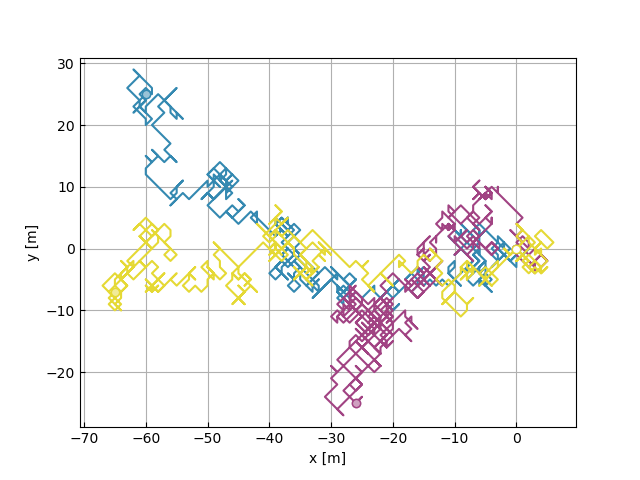
The generated trajectories can be inspected using the
plot_2d() function:
from yupi.graphics import plot_2d
plot_2d(tr, legend=None)
Langevin Generator
The LangevinGenerator simulates trajectories governed
by the Langevin Equation. It allows to produce Trajectory
objects that quantitatively emulate several systems.
To use it, we first need to define the general parameters for a generator:
T = 500     # Total time (number of time steps if dt==1)
dim = 2     # Dimension of the walker trajectories
N = 3       # Number of random walkers
dt = 0.5    # Time step
Then, some specific parameters can be set before the generator initialization:
gamma = 1       # Drag parameter
sigma = 0.1     # Scale of the noise pdf
Finally, the generator is created and the trajectories can be generated:
from yupi.generators import LangevinGenerator
lg = LangevinGenerator(T=T, dim=dim, dt=dt, gamma=gamma, sigma=sigma)
trajectories = lg.generate(N)
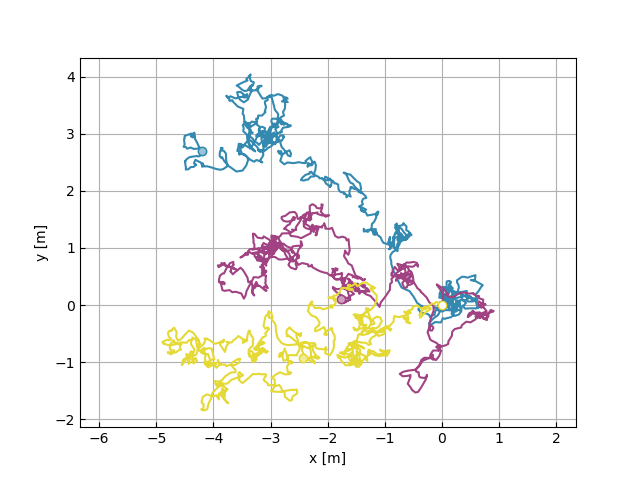
The generated trajectories can be inspected using the
plot_2d() function:
from yupi.graphics import plot_2d
plot_2d(trajectories, legend=None)
Although not illustrated in this example, the initial
velocities and positions can be specified in the LangevinGenerator
creation using the v0 and r0 parameters respectively.
A more complex application of this Generator can be
seen in the Example 1.
Diffusing Diffusivity Generator
The DiffDiffGenerator simulates trajectories governed by a
diffusion process with fluctuating diffusivity. It allows to produce
Trajectory objects that quantitatively emulate different systems.
To use it, we first need to define the general parameters for a generator:
T = 1000   # Total time of the simulation
N = 5      # Number of trajectories
dt = .1    # Time step
dim = 2    # Dimension of the Trajectories
Then, some specific parameters can be set before the generator initialization:
tau = 1         # Relaxation time
sigma = 0.1     # Scale of the noise pdf
The generator is created and the trajectories can be generated:
from yupi.generators import DiffDiffGenerator
dd = DiffDiffGenerator(T=T, dt=dt, dim=dim, tau=tau, sigma=sigma)
trajs = dd.generate(N)
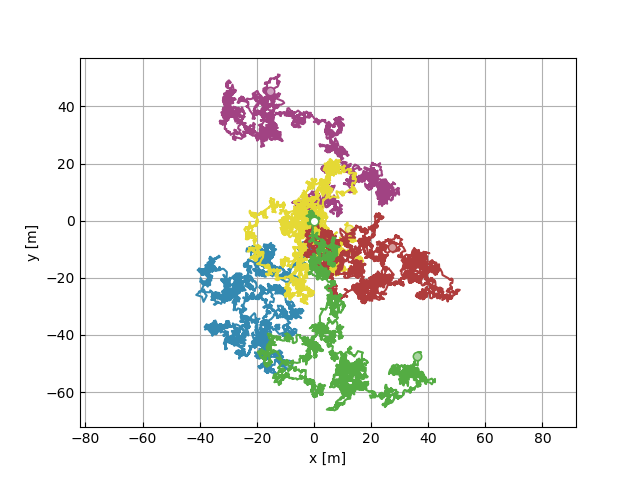
The generated trajectories can be inspected using the
plot_2d() function:
from yupi.graphics import plot_2d
plot_2d(trajs, legend=None)
Although not illustrated in this example, the initial positions can be
specified in the DiffDiffGenerator
creation using the r0 parameter.
A more complex application of this Generator can be
seen in the Example 2.
Defining a Custom Generator
A user-defined generator can be easily added by building on top of an abstract
class Generator (which is the base of the already
implemented generators).